

Most people use VideoSnack the manual way at first. Import a video, clean the transcript, generate a blog post. Then they want a newsletter from the same video, so they go back and generate again. Then a summary. Then social posts. Four visits to the same transcript, four sets of settings to remember, and if a teammate does it next week they’ll pick slightly different ones.
A workflow is how you stop doing that. You define the recipe once, and every video that goes through it produces the same set of assets the same way.
What a workflow actually is
A workflow is a list of steps attached to a source. Each step runs its own agent against the transcript, and each step produces its own resource.
The important detail is that the steps don’t run in sequence off each other’s output — they all work from the same transcript. Your newsletter isn’t a summary of your blog post, with the drift and telephone-game distortion that would cause. It’s an independent read of the source material, written to be a newsletter.
A workflow can hold several content steps and a social step. So one interview can come out the other side as a blog article, a newsletter, a short summary, and a full social pack, in one run.
Building one
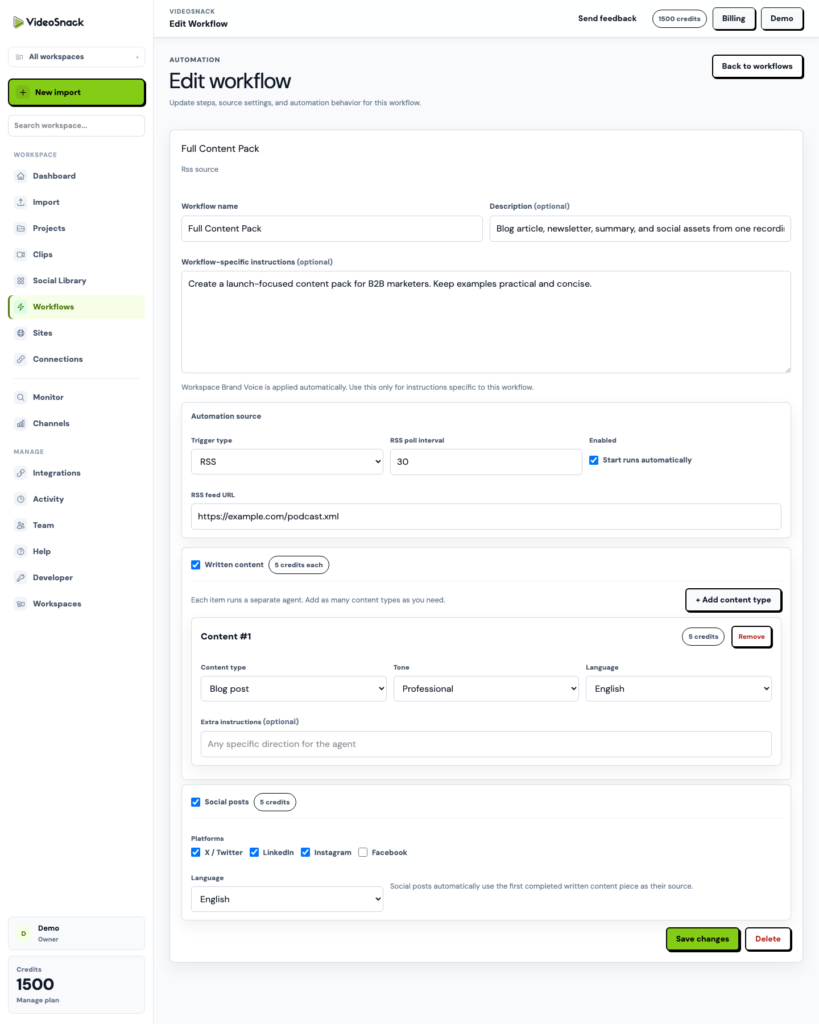
Open the workflow editor and add your steps. Each content step is configured the way a one-off generation is: pick the format, the tone, the length, the point of view, the output language, and any extra instructions specific to that step.
That last field is where a workflow gets genuinely yours. “Keep the pricing discussion out of the newsletter.” “Lead the blog post with the customer’s objection, not our answer.” “Third person, no first-person plural.” The preset gets you a format; the extra instructions get you your format.
Add a social step and the workflow will also produce platform-specific copy — X threads, LinkedIn posts, Instagram captions and hashtags, carousel content — from the same source.
Triggers: what starts the run
A workflow needs something to set it off. There are four options, and the one you choose says a lot about how much of your process you want to stop touching.
Manual is the honest starting point. You attach the workflow during import and it runs. Most teams live here for a while, and there’s nothing wrong with that — you still get the consistency, you just decide when.
RSS watches a feed. New podcast episode publishes, the workflow runs, your assets are waiting. This is the setup for anyone with a recurring show, because the trigger is already something you do — publishing the episode — rather than a new habit you have to build.
Webhook lets anything else start a run: Zapier, Make, n8n, a form submission, a CRM event, a script you wrote. If your process starts somewhere other than VideoSnack, this is how you connect it.
Monitors close the loop with discovery. A monitor watches YouTube channels or keywords; when it finds something relevant, an approved discovery can run a workflow against it. Research becomes drafts without a person in the middle.
Watching a run
Runs are tracked per step, which matters more than it sounds. When a workflow produces five things, “it failed” is not useful information. You want to know that the blog post and newsletter are fine and the social step is the one that needs another look.
Per-step status also means a slow step doesn’t hide the finished ones. The article is ready to edit while the rest is still working.
Where it stops being worth it
Workflows pay off on repetition. If you publish one video a quarter, building a recipe is overhead you won’t recoup — just generate what you need and move on.
The break-even shows up around the time you notice you’re making the same decisions again. A weekly show, a monthly webinar, a client who sends three interviews a month. That’s when defining it once and forgetting about it starts returning real time.
The other honest limit: a workflow makes drafts, not finished posts. The editor is still where you fix the intro, add the links, and cut the paragraph the agent liked more than you do. What a workflow removes is the setup, the remembering, and the four separate trips back to the same transcript. That’s most of the tedium, but it isn’t the judgment.
Try it on your next video
Build a workflow with two steps — whatever two formats you actually publish — and attach it on your next import. Two is enough to feel the difference, and small enough that you’ll finish setting it up.
The free trial has 100 credits, which covers a real run. Start here.