
B2B SaaS content has a credibility problem, and it isn’t a writing problem. It’s that most of it is written by people guessing at what customers care about, using the words the company wishes customers used.
The cure is sitting in your call recordings. Customers describing their problem in their own vocabulary. Support explaining the workaround. A sales engineer answering the objection better than your website does. That’s the raw material, and almost none of it gets published.
Customer interviews are your best asset, not webinars
Every SaaS team defaults to repurposing webinars, because a webinar is already a content object and feels like it should become a post.
But the highest-value recordings you have are customer interviews. They contain proof — specific numbers, real before-and-after, the objection they had at evaluation and what changed their mind. A customer story built from an actual interview reads differently than one built from a template and a quote you asked marketing to approve.
Import the interview, clean the transcript, and generate a customer story draft. The specificity survives because it’s in the source. That’s the whole trick: you can’t template your way to a real detail, but you also don’t have to, because your customer already said it.
Product tutorials from the demos you already give
The other underused pile is product recordings. Demos, onboarding calls, internal walkthroughs, the Loom your PM made explaining a feature to support.
Those become product tutorials and education content — the stuff that fills the gap between your marketing site and your docs, which for most SaaS companies is a canyon. It’s also the content that ranks, because it answers the question someone typed rather than the question you wish they’d typed.
One 20-minute onboarding call usually contains three tutorials. You’ve just never had a reason to transcribe it.
Mapping recordings to funnel stages
It helps to be deliberate about which recording becomes which asset:
- Customer interviews → customer stories, quote-led posts, proof for the sales team. Bottom of funnel.
- Product demos and walkthroughs → tutorials, feature explainers, docs-adjacent education. Middle.
- Webinars and talks → recap articles, newsletter sections, LinkedIn campaigns. Top.
- Internal explainers → the positioning post nobody has managed to write.
The point of the map is that “repurpose the recording” isn’t a strategy. Different sources carry different evidence, and the evidence should decide the format.
Watching the category
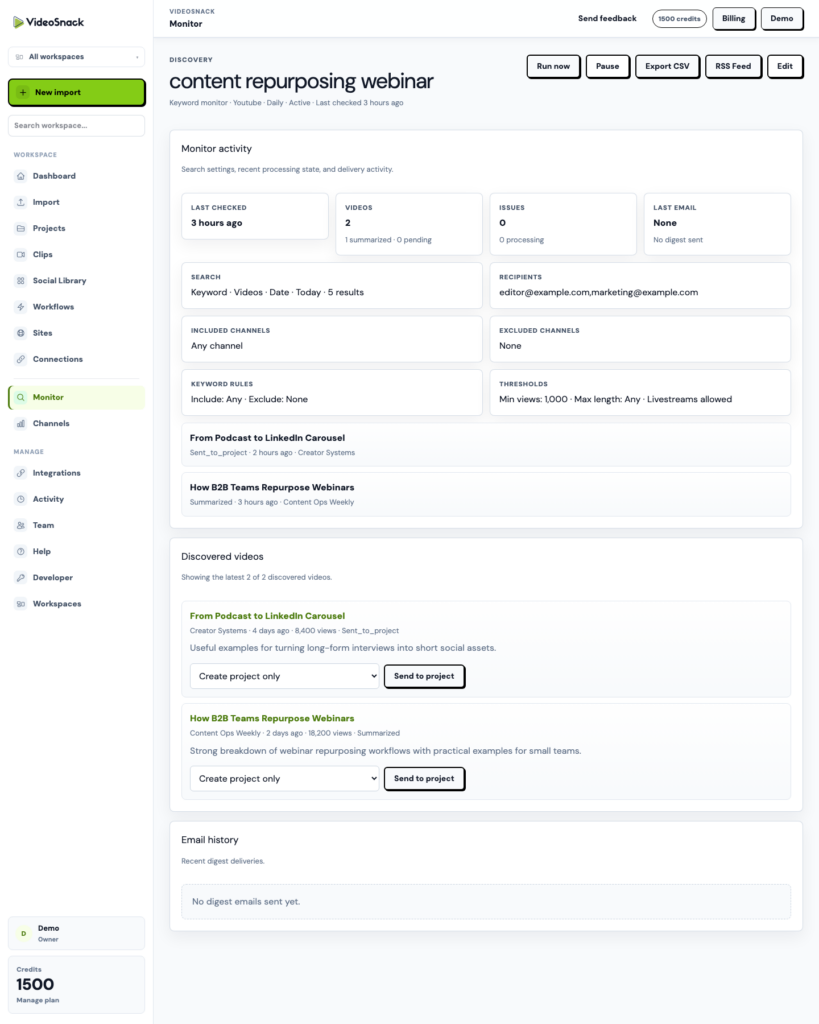
Monitors are the piece most SaaS teams don’t expect. Point one at competitor channels or a category keyword and it summarizes new videos and emails a digest.
Practically, that means you find out your competitor shipped a positioning change from a summary in your inbox rather than from a prospect on a call. Connect a workflow and a relevant discovery can turn into a draft response automatically.
Getting it into the resource center
Most SaaS teams have a WordPress blog and a hard-won publishing process. Connect the site with an Application Password and publish drafts from the editor as posts or pages — no Markdown copy-paste, no reformatting.
SEO title, description, and a checklist score are generated in the editor, so the metadata happens as part of the draft rather than as the step everyone forgets on Friday.
If you need outputs somewhere else entirely — a data warehouse, a CMS you built, a review queue in Linear — there’s an API with keys and OpenAPI docs, plus signed content.ready and social_pack.ready webhooks.
Start with one customer call
Take the best customer interview you recorded this quarter, import it, and generate a customer story. Read it against the last one you wrote from a template.
If the difference is obvious, you know which recordings to import next. The free trial includes 100 credits. Start here.